



Technical Services logo with red banner and blue swoosh accents
249 VAN Launch Kit 249 VAN Consumer Brochure Smart Thermostat Sell Sheet 249 VAN Launch Kit

Unlock the Full Potential

View Quick Start Guide

This installation was on a 4-story home, and the tech had not yet gone to the basement to troubleshoot the “infinity” water source heat pump, as he was told he by the homeowner. He was in the attic at the infinity furnace above the 4th floor. He was getting his dcv in the proper range on his A and B green plug on the air handler, 3 to 4 vdc. His indoor board ohm reading was in range, 28k to 32 k. The tech ohmed out the A and B thermostat wires on the water source heat pump from the upstairs. His ohm reading was not in range of a normal infinity board. His reading was around 64.4k. The tech then made the long walk to the basement where the “geothermal heat pump” was located. Bingo. 

Disclaimer: The technical statements, information and recommendations contained herein are believed to be accurate as of the date hereof, but Mingledorff’s does not make representations or warranties, express or implied, as to its accuracy, its completeness, or the results to be obtained. The information is being provided for informational purposes only and is intended for use by persons having adequate skill and expertise regarding the proper selection, use and application of the products and recommendations and at their own risk and discretion. 

Portrait of a man in a blue polo shirt against a light background

Kevin Thigpen

Technical Services Manager North Alabama District

July 2, 2020

Registering an Ion® System Controller

Ion® System Controller

Each Ion® System Controller needs to be register this is how the Factory’s server knows it has been installed and will receive automatic, over-the-air updates ect.


The Service Group gets calls and the Service Tech doesn’t know how to register the Controller. This information will guide you through the steps to do this.

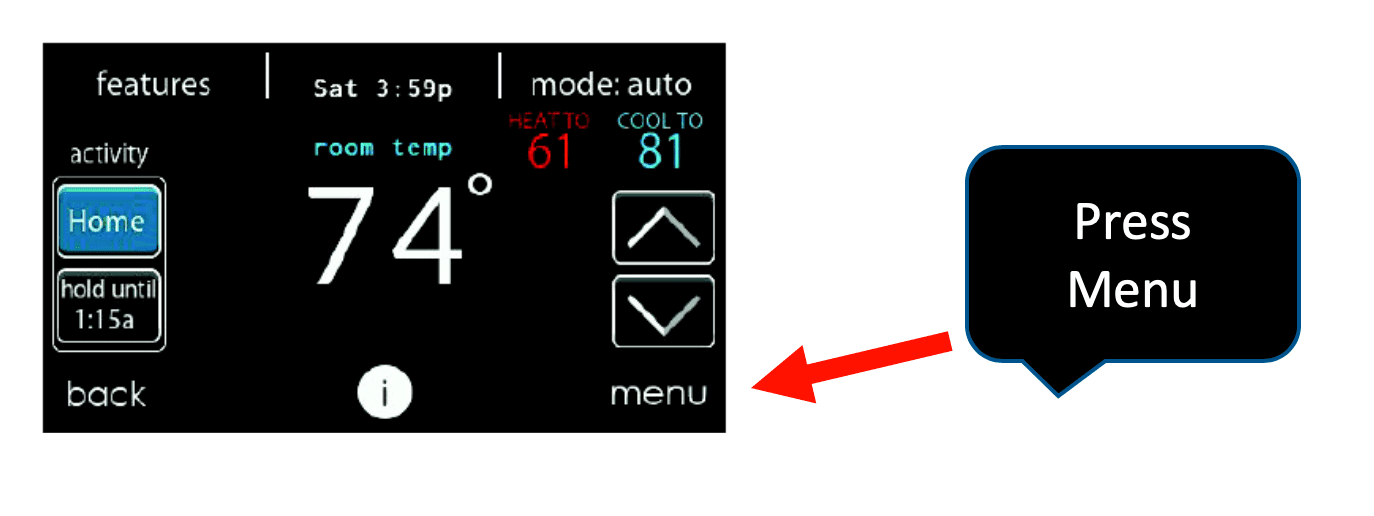
Thermostat display showing 74° with a red arrow pointing to the Menu button and a “Press Menu” callout.

Step 1


Press the Menu and arrow down to next page.


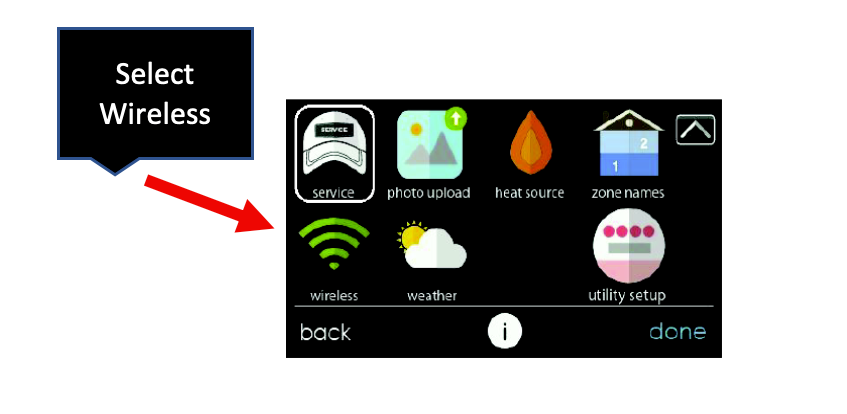
Wireless selection menu with icons; red arrow points to green Wi‑Fi icon labeled “Wireless.”

Step 2


Select "wireless".


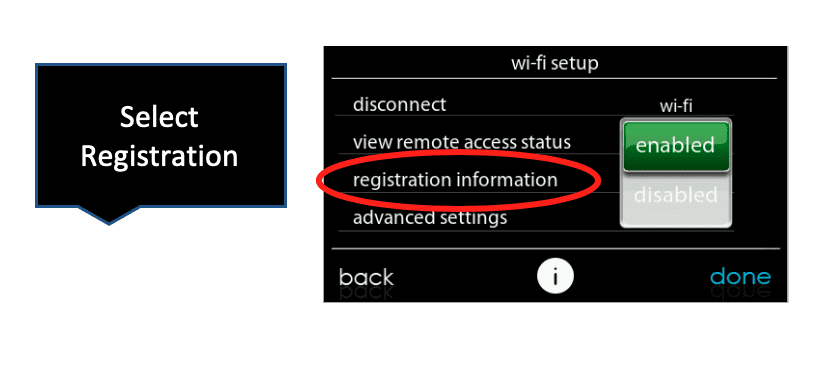
Camera setup menu with “registration information” circled in red and a “Select Registration” callout arrow.

Step 3


Select "registration information".


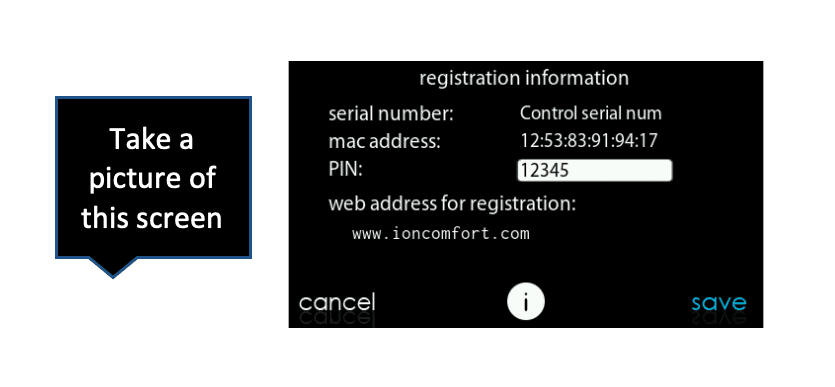
Instruction bubble points to a black registration information screen with serial number, MAC address, PIN and save/cancel buttons.

Step 4


Take a photo of this screen with your smartphone.


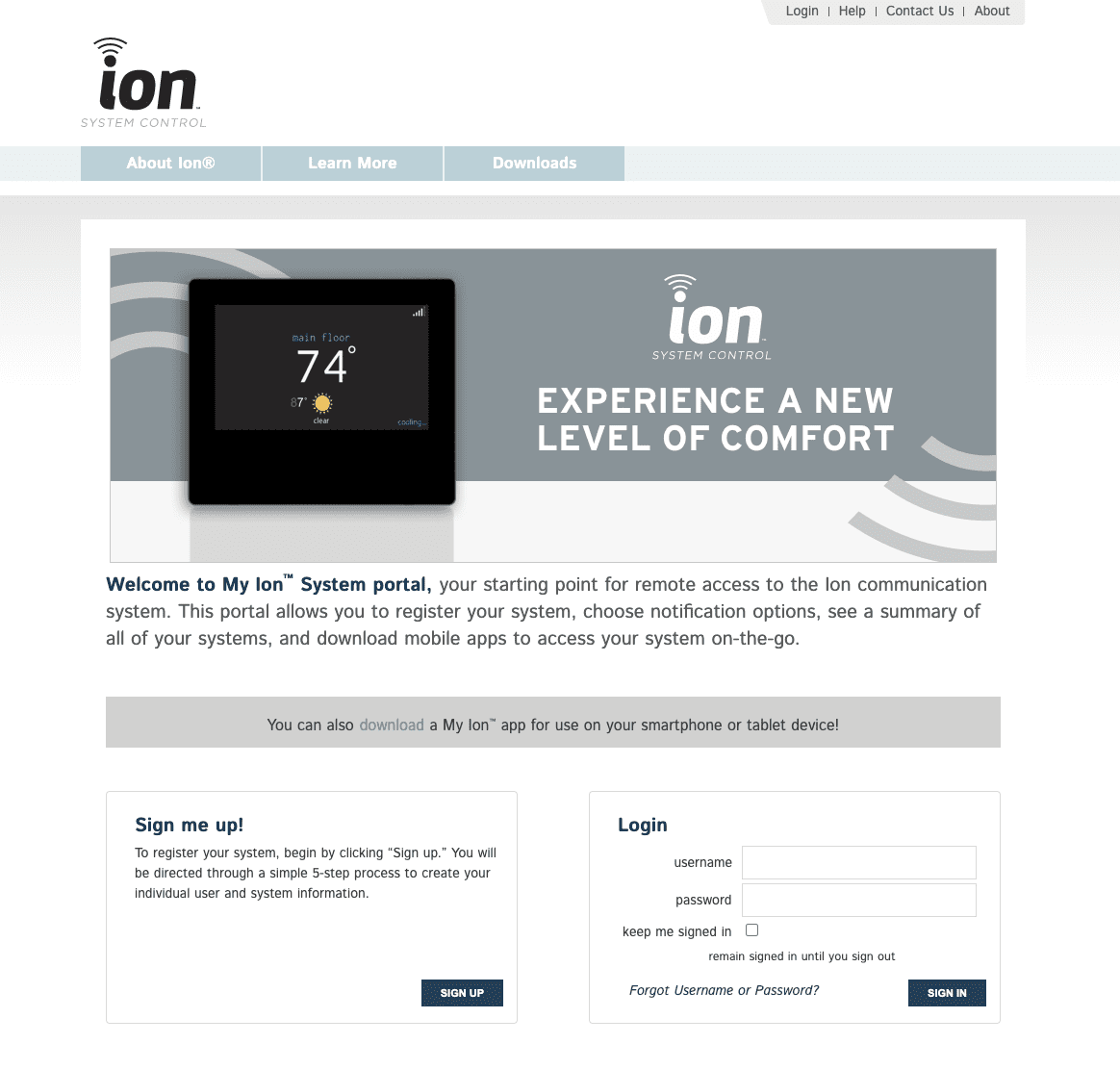
Ion website homepage promoting a smart thermostat with signup and login forms

Step 5


Go to www.IonComfort.com
(Note: for new account, go to "sign me up")


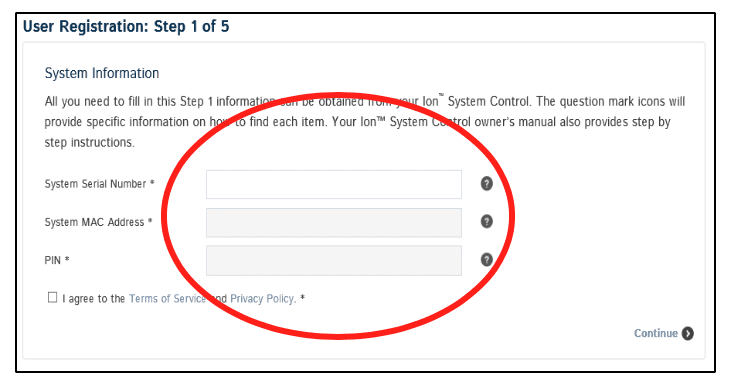
User registration form with three blank fields circled in red and a “Continue” button.

Step 6


Enter the serial number, system MAC address and PIN for your control.


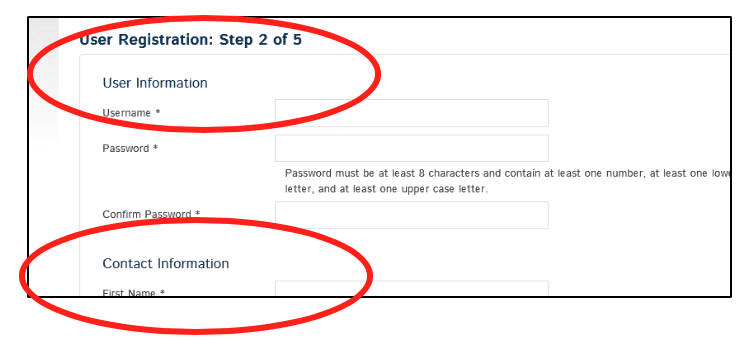
User registration form, step 2 of 5, with User Information and Contact Information sections circled in red.

Step 7


Fill in the following information:


  1. Select a username and password.
  2.  Enter the main contact person’s information.
  3. Enter the location name and address for your system.
  4. Enter the primary contact’s email address to receive system notifications and alerts.
  5. Continue through the screens until completed.

Follow the Steps provided and you will be able to register your ION IN NO TIME WITH NO TROUBLE.

249 VAN Launch Kit 249 VAN Consumer Brochure Smart Thermostat Sell Sheet 249 VAN Launch Kit

Unlock the Full Potential

View Quick Start Guide

This installation was on a 4-story home, and the tech had not yet gone to the basement to troubleshoot the “infinity” water source heat pump, as he was told he by the homeowner. He was in the attic at the infinity furnace above the 4th floor. He was getting his dcv in the proper range on his A and B green plug on the air handler, 3 to 4 vdc. His indoor board ohm reading was in range, 28k to 32 k. The tech ohmed out the A and B thermostat wires on the water source heat pump from the upstairs. His ohm reading was not in range of a normal infinity board. His reading was around 64.4k. The tech then made the long walk to the basement where the “geothermal heat pump” was located. Bingo. 


More to Explore

Family relaxing in a bright living room, parents on a gray couch with laptops while children play nearby
By Austin Sims August 4, 2026
At Mingledorff's we understand your business. We are your #1 HVAC and plumbing distributor choice. Trust our experience. Contact us today!
Mingledorffs
By Jenny Reed August 4, 2026
At Mingledorff's we understand your business. We are your #1 HVAC and plumbing distributor. Trust our experience. Contact us today!
Bright hobby shop with display cases, counter, and model kits; a few people stand near the back.
By Jenny Reed August 3, 2026
At Mingledorff's we understand your business. We are your #1 HVAC and plumbing distributor. Trust our experience. Contact us today!

Bright hobby shop interior with display cases, model kits, and a counter with two people inside.
By Jenny Reed August 3, 2026
At Mingledorff's we understand your business. We are your #1 HVAC and plumbing distributor. Trust our experience. Contact us today!


Heat Pump

Keep up with the latest HVAC news from Mingledorff’s Inc.