


Unlock the Full Potential
This installation was on a 4-story home, and the tech had not yet gone to the basement to troubleshoot the “infinity” water source heat pump, as he was told he by the homeowner. He was in the attic at the infinity furnace above the 4th floor. He was getting his dcv in the proper range on his A and B green plug on the air handler, 3 to 4 vdc. His indoor board ohm reading was in range, 28k to 32 k. The tech ohmed out the A and B thermostat wires on the water source heat pump from the upstairs. His ohm reading was not in range of a normal infinity board. His reading was around 64.4k. The tech then made the long walk to the basement where the “geothermal heat pump” was located. Bingo.
Disclaimer: The technical statements, information and recommendations contained herein are believed to be accurate as of the date hereof, but Mingledorff’s does not make representations or warranties, express or implied, as to its accuracy, its completeness, or the results to be obtained. The information is being provided for informational purposes only and is intended for use by persons having adequate skill and expertise regarding the proper selection, use and application of the products and recommendations and at their own risk and discretion.

Kevin Thigpen
Technical Services Manager North Alabama District
March 31, 2020
How to Check Fault Codes Stored in Controller
Mingledorff’s Technical Services Group would like to share these steps on how to check faults and HVAC codes to see if you have an “active” fault.
From time to time, our Technical Services Group gets calls where the Service Tech doesn’t know how to check the fault codes stored in the controller. This information is helpful with seeing how the system has been running. The following steps will help your Service Tech see the last 10 events the system has stored.

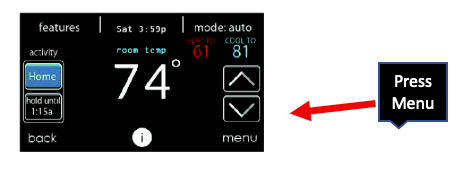
Step 1
From the main screen push the arrow on bottom right side of screen.

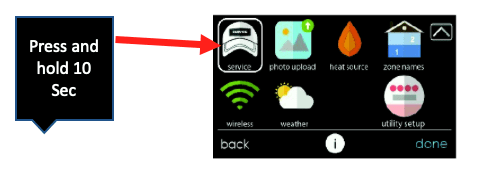
Step 2
You will see a baseball cap. Press and hold for 10 seconds (note the screen will change)

Step 3
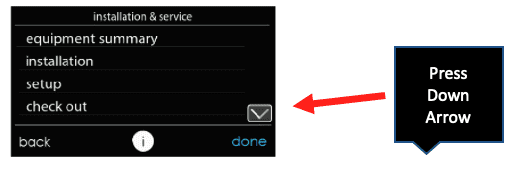
You are now in the installation and service screen. Press the arrow on bottom right.

Step 4
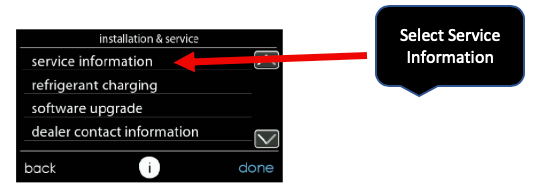
Select the service information.

Step 5
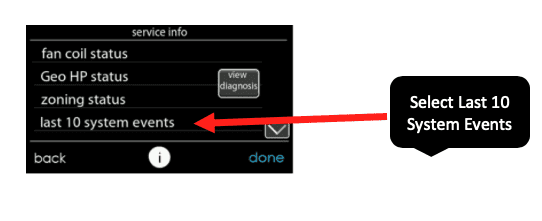
Select "last 10 system events".

Step 6
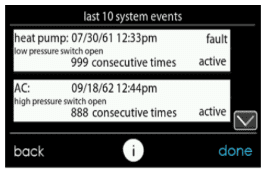
This screen will have the last 10 events. If it's an active fault, the system will not run until the fault is cleared.
By following these steps, you will be able to see the fault history, when the fault occured, and how many times the system has tripped on a fault.
Unlock the Full Potential
This installation was on a 4-story home, and the tech had not yet gone to the basement to troubleshoot the “infinity” water source heat pump, as he was told he by the homeowner. He was in the attic at the infinity furnace above the 4th floor. He was getting his dcv in the proper range on his A and B green plug on the air handler, 3 to 4 vdc. His indoor board ohm reading was in range, 28k to 32 k. The tech ohmed out the A and B thermostat wires on the water source heat pump from the upstairs. His ohm reading was not in range of a normal infinity board. His reading was around 64.4k. The tech then made the long walk to the basement where the “geothermal heat pump” was located. Bingo.
More to Explore
Heat Pump
Keep up with the latest HVAC news from Mingledorff’s Inc.