
Unlock the Full Potential
This installation was on a 4-story home, and the tech had not yet gone to the basement to troubleshoot the “infinity” water source heat pump, as he was told he by the homeowner. He was in the attic at the infinity furnace above the 4th floor. He was getting his dcv in the proper range on his A and B green plug on the air handler, 3 to 4 vdc. His indoor board ohm reading was in range, 28k to 32 k. The tech ohmed out the A and B thermostat wires on the water source heat pump from the upstairs. His ohm reading was not in range of a normal infinity board. His reading was around 64.4k. The tech then made the long walk to the basement where the “geothermal heat pump” was located. Bingo.
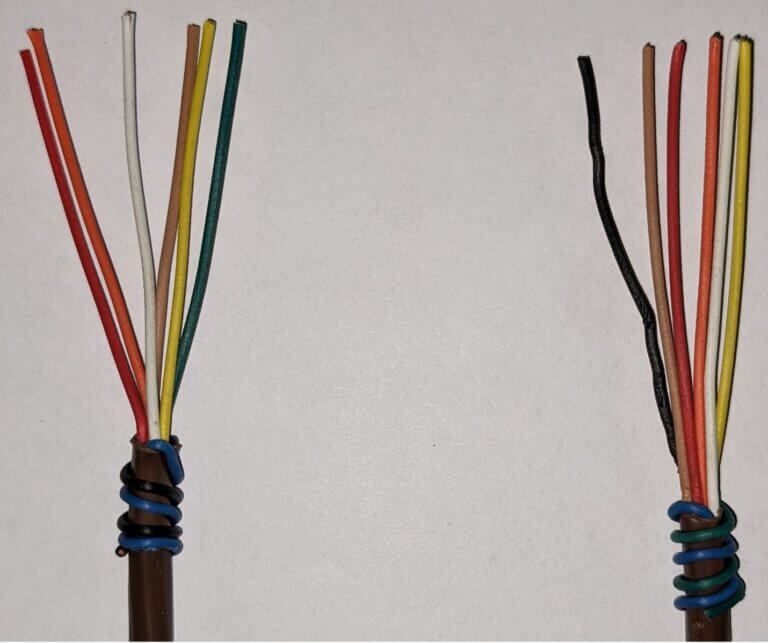
Now get out there and organize some zone wiring!
Zone equipment would be identified as indoor unit- blue black/ outdoor unit-blue green:
10) Once you have both cables disconnected remove them from the wire route in the bottom of the foam drain pan.

April 28, 2022
Using the Navigator Tool
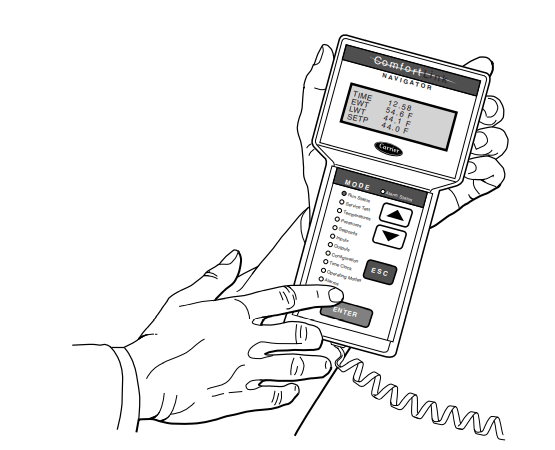
The Comfort Link Navigator is a great option for Comfort link products with faulty or non-responsive controllers. A lot of times the sun will fade the screens and you can’t see the LED readouts. The control buttons will also fail and get stuck so you can’t control anything.
So how do we fix these issues?
That’s where the Navigator comes in. You can do all of the same functions as the Comfort Link controller with a plus. It has a four-line read out screen. You can still force certain points on or off with the same authority as the Comfort link. It is universal so you can plug it into any Comfort Link with confidence.
Setting Up the Navigator
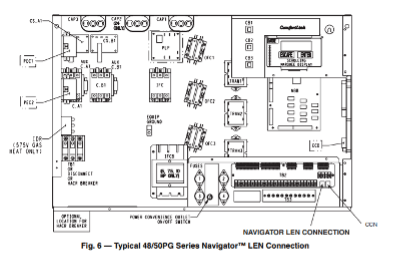
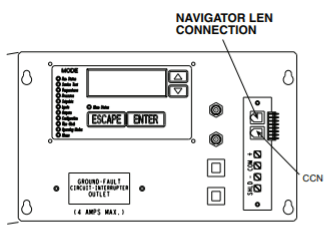
Only plug into the LEN port, do not plug into the CCN because it could damage the hand-held unit.
On every Comfort Link product there are two modular telephone style (RJ14) connector. They are labelled LEN which is Local Access Network. The other is labelled CCN which is Carrier Comfort Network. You will plug into the LEN port of the unit. All the power and data are done through the one LEN jack. No batteries or chargers are needed. It is a self-contained unit. It is also equipped with two large magnets on the back to ensure it stays on the unit while you are using it.
Accessing the LEN Ports
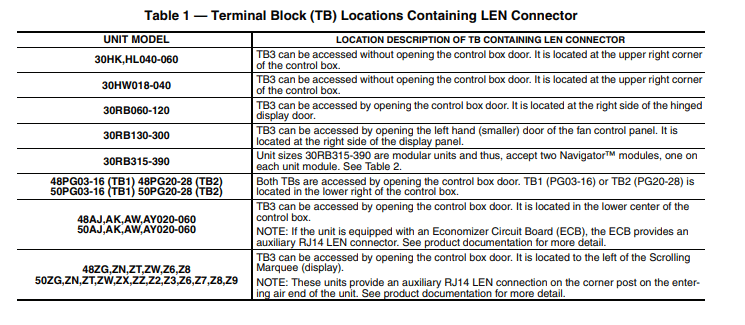
On some units, you can access the LEN port through means other than opening the electrical cabinet. See table below for locations:

Once you have located the plug locations and connected to the LEN port, the Navigator tool will start up.
You can use all the same functions as the Comfort Link controller mounted to the unit. However, with the Navigator tool, you have more than one read out screen, and no longer have to press escape and enter for every screen. Your local Mingledorff’s will be able to help you find one if you decide to purchase one.
Source: All information came from Form 30/48/50-6SI Installation Instructions


Unlock the Full Potential
This installation was on a 4-story home, and the tech had not yet gone to the basement to troubleshoot the “infinity” water source heat pump, as he was told he by the homeowner. He was in the attic at the infinity furnace above the 4th floor. He was getting his dcv in the proper range on his A and B green plug on the air handler, 3 to 4 vdc. His indoor board ohm reading was in range, 28k to 32 k. The tech ohmed out the A and B thermostat wires on the water source heat pump from the upstairs. His ohm reading was not in range of a normal infinity board. His reading was around 64.4k. The tech then made the long walk to the basement where the “geothermal heat pump” was located. Bingo.
More to Explore
Heat Pump
Keep up with the latest HVAC news from Mingledorff’s Inc.